Solution

Store Automation

Wire imports, AI content, image generation, and Shopify sync into hands-off pipelines that run your store while you sleep.
Store Automation

The manual work that is killing your margins

Every product you add to your store follows the same tedious script. Source the listing from a supplier. Rewrite the title and description so it does not read like a wholesale catalog. Generate or edit product photos so they match your brand. Set pricing with the right markup. Tag it, categorize it, sync it to Shopify, and publish. Multiply that by hundreds of SKUs across multiple stores, and you are spending more time on data entry than on actually growing your business. EcomVault replaces that entire loop with connected automation -- from the moment a product URL enters your system to the moment a polished listing goes live on your storefront, every step can run without you touching it.

Import-to-listing pipelines that run themselves

Auto-priced from the source: Configure per-source price multipliers (one rate for AliExpress, another for CJ Dropshipping, another for 1688) with six rounding modes so your margins are locked in the moment a product is imported -- no spreadsheet required.
AI content on arrival: Your Brand Book content templates fire during import, generating optimized titles, rich HTML descriptions, SEO metadata, and FAQ sections shaped by your brand voice before the product even hits your review queue.
Auto-categorization: Enable AI-driven category assignment and imported products are automatically slotted into your existing Shopify collections based on their attributes.
Workflow triggers on import: Set any workflow to fire the moment new products land from a supplier import. The product enters EcomVault, and your entire post-import pipeline -- content generation, image enhancement, background removal, Shopify sync -- kicks off automatically.
Staging group triggers: Products that enter a staging group automatically launch assigned workflows, bridging your import pipeline directly into content generation without a manual handoff.
Multi-store batch import: Import the same products to two, five, or all of your connected stores in one operation. Each store gets its own template overrides and pricing rules, so the US store receives American English copy with USD pricing while the EU store gets localized content with VAT included.
Idempotent, retry-safe execution: Batch imports use idempotency keys to prevent duplicates. If your browser refreshes mid-import, EcomVault picks up where it left off. Failed jobs can be retried with one click from the Import History dashboard.

Visual workflows that chain AI across your catalog

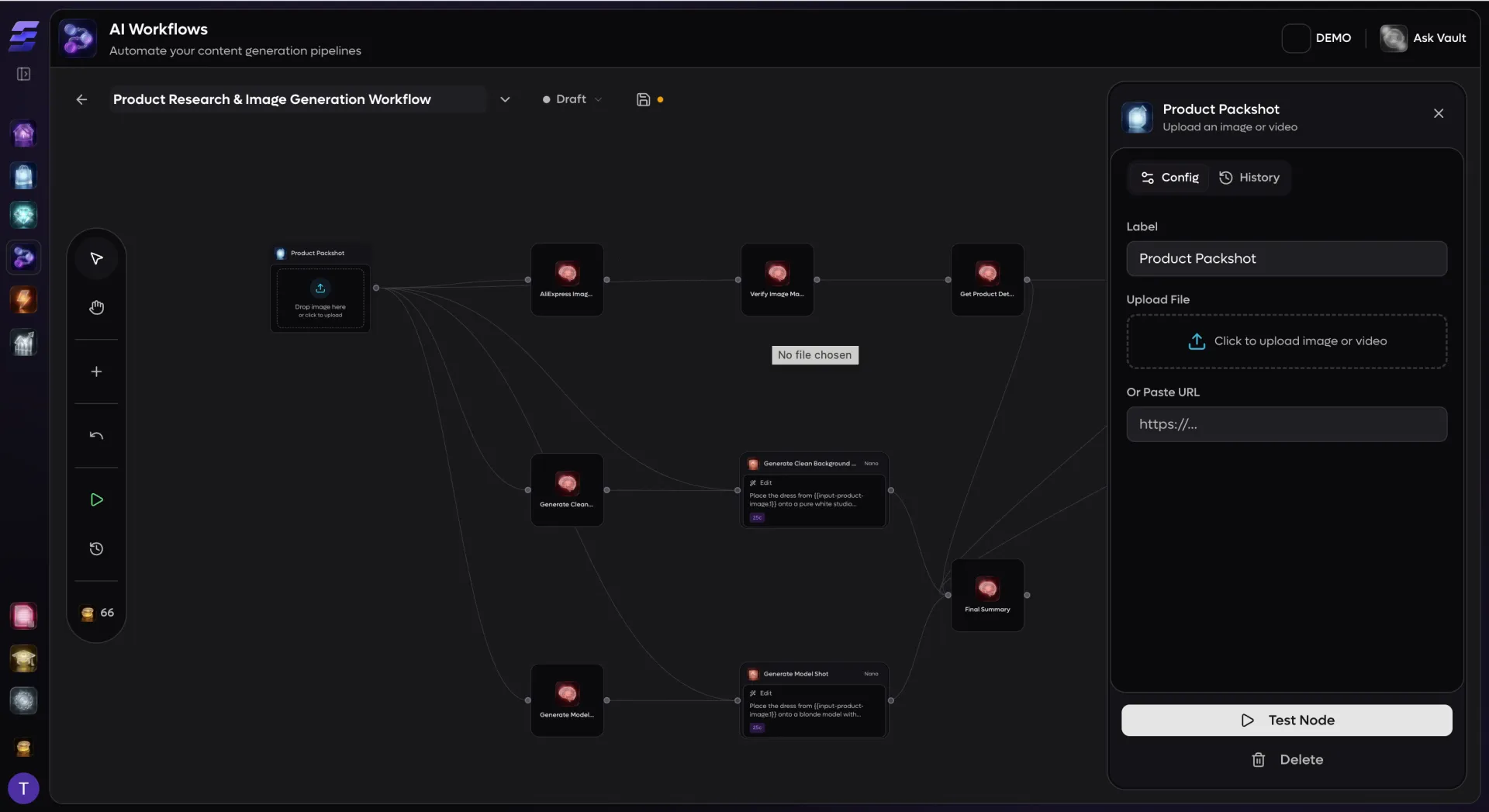
Drag-and-drop automation canvas: Build multi-step pipelines on a visual node graph. Wire a Product Source into a Text Block that rewrites descriptions, chain that into an Image Block that generates lifestyle photos, and terminate with a Shopify Sync node that pushes everything to your store -- all without writing code.
12 node types for any task: Source nodes pull products, files, or AI model images. Processing nodes generate text (titles, descriptions, SEO copy), create and edit images (composites, background removal, upscaling to 4K), and produce short-form video. Output nodes save media back to your product library or sync directly to Shopify.
Five trigger types: Launch workflows manually, on a recurring schedule, when products are imported, when products enter a staging group, or via an external webhook -- so your automation responds to the events that matter.
Conditional branching: Route products down different paths based on category, price, tags, or any upstream output. A Condition node evaluates expressions using variable references and comparison operators so packshots and on-model photos get different treatment automatically.
AI copilot builds workflows for you: Describe what you want in plain language, and the Workflow Agent designs the entire node graph -- complete with model selection, prompt templates, and edge connections -- ready for you to review and activate.
Batch execution at scale: Select up to 100 products and run them all through a workflow in one click. EcomVault handles queuing, parallel execution, per-node credit estimation, and progress tracking behind the scenes.
Save to Product and Shopify Sync terminals: Generated images, videos, and rewritten text flow back into your product library or directly to your connected Shopify store with configurable media roles, alt-text sourcing, and create/update/upsert sync modes.

Bulk operations and store sync that close the loop

Bulk status updates: Select products from your library and change their status (draft, active, archived, ready, staging) in one action across your entire selection.
Bulk tagging: Add or remove up to 20 tags at once across any number of selected products to keep your catalog organized as it scales.
Bulk pricing: Update retail prices and compare-at prices across all variants of a product simultaneously, with automatic sync-pending marking so changes propagate to Shopify on the next push.
Bulk Shopify sync: Push dozens or hundreds of products to your connected Shopify store in a single operation. EcomVault chunks the work into batches of 100, skips products already mid-sync, and tracks queued, triggered, skipped, and failed counts in real time.
Checksum-based smart sync: The Shopify sync engine computes a per-product checksum covering title, description, variants, options, media, and metafields. If nothing changed, the sync is skipped entirely -- saving API calls, credits, and time.
Full product sync pipeline: Every sync handles upsert of the store product record, option and variant mapping, media upload to R2 with reorder support, metafield synchronization, taxonomy assignment, and collection membership -- all in a single database transaction per product.
End-to-end automation: Combine import triggers, workflow processing, and bulk sync into a seamless chain. Products enter via a supplier URL, pass through AI content and image generation, land in your library fully enriched, and push to Shopify -- all without manual intervention. Your store updates itself.