Core Feature

Brand Book

Define your brand identity once — logos, colors, content templates, visual presets, and AI model personas — and every output across EcomVault stays on-brand automatically.
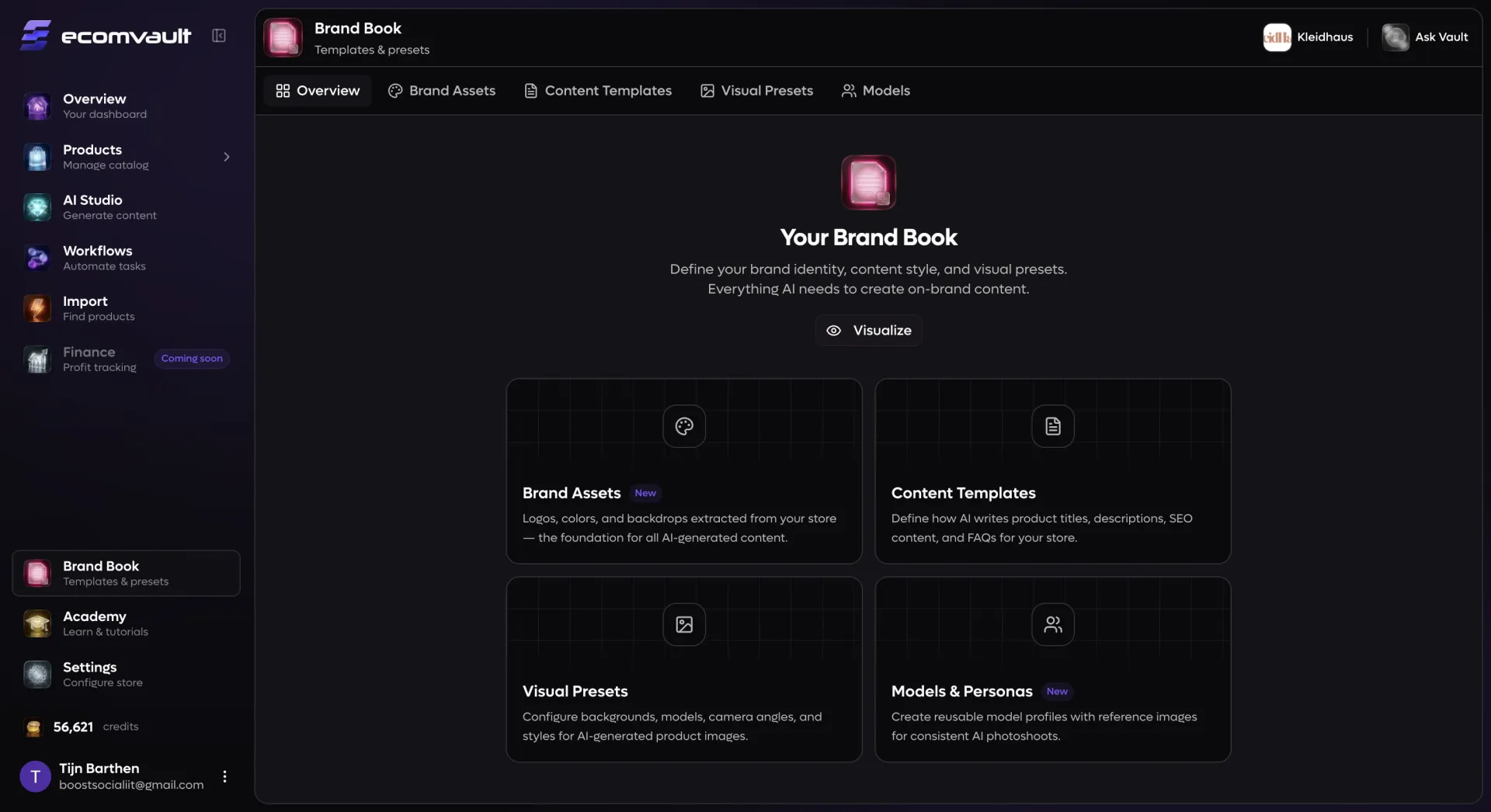
Brand Book

Your entire brand identity in one place

E-commerce brands produce an endless stream of content: product titles, descriptions, SEO metadata, FAQ pages, lifestyle photography, and packshot images. Without a centralized system, each piece drifts further from your brand identity. Brand Book solves this by giving you a single hub where you define exactly who your brand is — visually, verbally, and stylistically. Once configured, every AI tool in EcomVault reads from your Brand Book automatically. When you generate product descriptions during Import, the AI writes in your voice. When you create lifestyle photos in Studio, your model personas, color palette, and visual presets are pre-loaded. When you run bulk content generation across your catalog, every output inherits your brand rules without any extra setup. Update your Brand Book once, and the change propagates everywhere instantly.

What you can configure

Brand assets with one-click extraction: Upload your logos (primary, icon, wordmark, favicon, dark/light variants), define your brand color palette (primary, secondary, accent, background, text), and add backdrop images — or let EcomVault automatically extract all of them from your store URL using the OpenBrand integration.
Content templates for every content type: Build reusable templates for product titles, product descriptions, SEO meta titles, SEO meta descriptions, and FAQs. Each template type has its own configurator — short-form templates use drag-and-drop structure builders with variables like brand name, product type, material, season, and target audience; long-form templates use ordered content blocks (headline, paragraph, bullet points, benefits, specifications, images, call-to-action) with per-block instructions.
Visual presets for lifestyle and packshot photography: Configure complete image generation presets covering backgrounds (studio, urban, forest, beach, minimal, dark, gradient), model selection from 40+ diverse pre-built personas, crop framing (full body, upper body, close-up, selfie), facial expressions, poses, body rotations, camera angles (eye-level, low angle, 85mm, macro), and color tones (warm, cool, cinematic, noir, neon, golden hour). Packshot presets add product-specific controls for angles, lighting, and surfaces.
Custom AI model personas: Create detailed human model profiles for consistent AI-generated product photography. Define gender, ethnicity, skin tone, eye color, hair color/style/length, body type, age group, facial hair, and skin characteristics (freckles, vitiligo, scars, and more). Upload reference images and generate AI portraits directly in the model creator — then reuse the same persona across every Studio session.
Good and bad examples per template: Provide concrete examples of content you love and content you want to avoid for each template. The AI uses these as stylistic guardrails, dramatically reducing revision cycles and keeping output quality consistently high.
Length and structure constraints: Set minimum and maximum character counts, choose separators and variable ordering for titles, and define block-by-block instructions for descriptions — giving you precise control over every generated output without writing the content yourself.

How it works

Start from the Brand Book overview, which organizes everything into four sections: Brand Assets, Content Templates, Visual Presets, and Models & Personas. In Brand Assets, connect your store URL and click "Extract from store" to automatically pull in your logos, brand colors, and backdrop images — or upload and fine-tune them manually with the drag-and-drop editor. In Content Templates, create templates for each content type with the visual configurator: drag variables into a title structure, arrange description blocks in order, add FAQ topic lists, and provide example outputs. In Visual Presets, build complete photography configurations by selecting from preset grids for every parameter — background, model, crop, expression, pose, rotation, camera, and tone — for both lifestyle and packshot types. In Models & Personas, walk through a step-by-step character builder to define every physical attribute, generate AI reference portraits with your choice of image model, and save the persona for reuse. Once saved, use the Brand Visualizer to preview how everything comes together on a simulated product page — complete with your logo, color scheme, generated content, and AI imagery — in both desktop and mobile views.

Results you can expect

Total brand consistency at scale: Every product listing, AI-generated image, and piece of copy reflects the same brand identity, whether you generate ten outputs or ten thousand.
Dramatically faster content creation: Skip repetitive briefing and style correction — your brand context is already baked into every generation, cutting production time from hours to minutes.
Per-store brand profiles: Operate multiple stores with completely distinct identities — different logos, color palettes, content templates, visual presets, and model personas — all managed from one dashboard.
Fewer revision cycles: When the first AI draft already matches your brand voice and visual style, you spend less time editing and more time scaling your catalog.
Inclusive, representative model personas: Build diverse AI model profiles that genuinely represent your target audience, with granular control over ethnicity, body type, age, skin characteristics, and more — no stock photo limitations.
Live brand preview: Use the built-in Brand Visualizer to see exactly how your brand settings translate to a real product page before going live, catching mismatches early and iterating in real time.
One update, everywhere: Change a color, swap a logo, or revise a content template — every future AI generation across Import, Studio, and Workflows automatically picks up the new settings.